Refining Commands
This chapter exposes an important technique that can bring better concurrency as well as std kind of performances.
Merging objects
In the current model, even if a Task is not yet filled with commands for the robots, there are already 128 RobotArms created. This multiply the problem dimension by a bit more than 100.
Instead of separating the robot arms, another idea is to merge all of them into one object, and then move the robot arm identifier as a property of the command. In this case, we simply divide the number of objects by 100, which is quite important.
We are going to have this approach using 2 different ways :
- Using a
Collectionto merge objects and maintain excellent concurrency - Using a
Vectorto merge objects and have maximum performance (but worse concurrency)
Using a Collection
The refined model, Model4 is implemented as below :
class Model4 : public DataModel <Model4> {}; |
class Command4 : public Object |
{ |
public: |
Float position; |
Float duration; |
Int arm; |
Int opcode; |
}; |
class CommandCache4 |
{ |
public: |
bool operator < (const CommandCache4 & rhs) const; |
Collection <Command4>::iterator |
it; |
double position; |
double duration; |
}; |
class TaskRobot4 : public Task |
{ |
public: |
void update_cache (); |
void emplace (double position, double duration, int pitch, int opcode); |
RobotArm::iterator |
erase (double position_start, double position_end, int pitch); |
RobotArm::iterator |
split (double position, int pitch); |
std::array <std::vector <CommandCache4>, 128> |
arms; |
Collection <Command4> |
commands; |
}; |
In this model, the robot arm number has been moved into the command, and we are using a Collection for all commands.
Then because algorithms want to have one "track" per arm, a std::array is formed for that, which acts like a cache.
Controlling through emplace, erase or split will update the cache and fill the commands member simulatneously. When there is an external change, a call to update_cache will read the commands and fill the std::array appropriately.
The algorithm to udpate the cache is a naive one : it just erase all arms and rebuild the cache from scratch. However this already brings very good performance, so it is unsure if having a differentiation algorithm would lead to better performances.
With this model, we also have better concurrency, as 2 users can edit the container concurrently without conflicts. If the application needs animations and moving a command from one arm to another, detecting an arm change is easier when this is property than when there is a move from one container to another.
The performances are also far better and exposed below in the Results section.
Using a Vector
Another approach, Model5 is implemented as below :
class Model5 : public DataModel <Model5> {}; |
class Command5 |
{ |
public: |
void write (StreamBinOut & sbo) const; |
void read (StreamBinIn & sbi); |
bool operator < (const Command5 & rhs) const; |
double position; |
double duration; |
int arm; |
int opcode; |
}; |
class TaskRobot5 : public Task |
{ |
public: |
void model_to_cache (); |
void cache_to_model (); |
void emplace (double position, double duration, int arm, int opcode); |
RobotArm::iterator |
erase (double position_start, double position_end, int arm); |
RobotArm::iterator |
split (double position, int arm); |
std::array <std::vector <Command5>, 128> |
arms; |
Vector <Command5> |
commands; |
}; |
In this model, instead of having a Collection of commands, we have a Vector of commands.
Tracking is a bit more difficult, so when the cache is changed, then the model needs to be updated from the cache and this is done also naively. However, as well as above, this approach brings already very good results.
With this model we have worse concurrency, but with maximum speed.
The performances are exposed below in the Results section.
Results
The bar chart below shows the time it takes to fill a document with 16 factories and various nbr of jobs (and so robots) for a total of 2 millions commands :
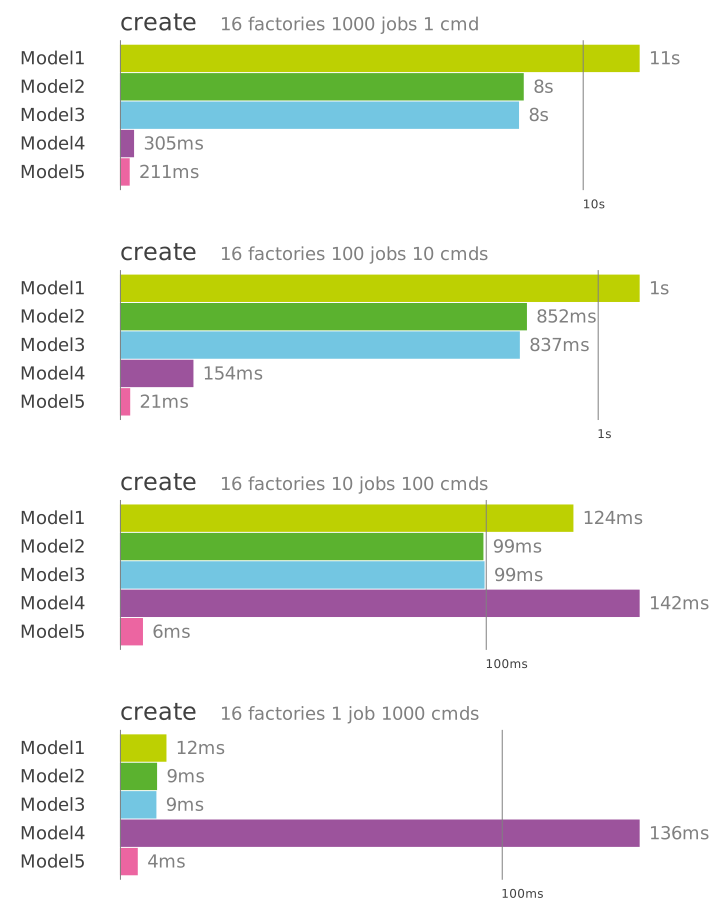
We can see the huge enhancement most of the time. And even when the Model4 seems to behave badly, just note that the timing are as low as 150 ms.
The next chapter, Results, shows the optimisation results with bar charts for various operations.